Building a Workflow Orchestration Platform on Temporal
Events + filters as triggers, activities as work units, and Temporal as the durable execution layer — how I designed a fault-tolerant workflow platform meant to sit between systems and agents.
Jun 2, 2026 · 10 min read
Most product platforms eventually need the same capability:
When something happens, run a sequence of actions — reliably, even if those actions take seconds, hours, or months.
That sounds like a job queue. It is not. Once you add sleeps, branching, fan-out, retries, compensation, and “use the output of step 2 as input to step 5,” a queue becomes a distributed state machine you maintain yourself.
This post is about building a workflow orchestration platform on Temporal: what Temporal is, why it mattered, how I modeled events, filters, triggers, and activities, and why the platform was designed as a durable layer that agents could later build on.
One early agent on top of it: an auto ticket status management agent — read a new message on a ticket, decide whether the status should change, and take that action through the workflow layer rather than ad-hoc scripts.
The mental model
Three concepts:
| Concept | Meaning | Example |
|---|---|---|
| Event | Something that happened | Ticket created, message received, tag added |
| Activity | An action to take | Add a comment, update status, call an API |
| Workflow | How activities run when a trigger matches | On ticket created from Slack → add welcome comment |
Put together:
Workflow = Trigger (Event + Filters) + ordered / parallel Activities
Filters narrow the event. Activities are the work. How those activities run — order, waits, retries, compensation — is under the workflow’s control, not scattered across services.
A simple example:
On ticket creation, if the source is Slack, add a comment:
“Hi <customer>, your ticket <id> has been created.”
Trigger event: ticket created. Filter: source is Slack. Activity: create comment.
A more interesting example is long-running: bump a ticket, wait, bump again, then close — sleeps measured in days, with state preserved across process restarts.
Why not just SQS (or any queue)?
Queues are excellent at delivering messages. They are awkward at orchestrating processes.
If you build this on SQS alone, you end up inventing:
- per-step state machines in your database
- correlation IDs tying messages across queues
- “wait N days” as delayed messages plus careful idempotency
- fan-out / fan-in by hand
- retry policies that differ by step
- compensation as another set of queues and conventions
- observability that reconstructs a run from scattered logs
It works until it does not. Complexity compounds in the application layer.
Temporal flips that: you write the orchestration as a workflow definition — essentially a durable function — and the platform owns retries, timers, history, and worker failover.
What Temporal is
Temporal is a durable workflow orchestration system. Three pieces:
- Client — starts a workflow run from your service
- Server — stores workflow history, schedules work onto task queues (cloud or self-hosted)
- Worker — polls a task queue, executes activities, advances the workflow
In our setup the client and workers lived in our services; Temporal Cloud acted as the server.
  Your API / event processor          Temporal Cloud           Your workers
   ─────────────────────────           ──────────────           ────────────
  startWorkflow(definition, args)  →  history + timers   →   poll task queue
                                      schedule activities      run activity code
                                      resume after sleep       report result
The important property is determinism of the workflow function.
Temporal replays workflow history to reconstruct state. The workflow code that decides what happens next must be deterministic. Side effects — HTTP calls, DB writes, “send Slack message” — belong in activities. Temporal can retry activities, wait for them, and resume the workflow as if time paused between lines.
Their classic illustration:
export async function processOrder(orderId: string) {
  await chargePayment(orderId);
  await updateInventory(orderId);
  await shipOrder(orderId);
  await sendNotification(orderId);
}
If the first two steps succeed and shipping fails, Temporal retries shipping — it does not restart the whole function from scratch. State is preserved as if the third line had not completed yet.
That is the difference between a queue consumer and a workflow engine.
Platform shape: registries + dynamic workflows
Customers (and later agents) create many workflows. You cannot ship a new Temporal workflow function for every automation.
So the Temporal workflow definition is dynamic: one registered function that takes a workflow config — a list of steps — and executes them according to dependencies, filters, retries, and failure policy.
Apps / channels / agents
        │ emit events
        ▼
   Event ingestion (queue)
        │
        ▼
 Event processor
   · validate event
   · find workflows whose trigger matches
   · apply filters
   · start matching workflow instances
        │
        ▼
   Temporal (durable execution)
        │
        ▼
   Workers
   · dynamic workflow definition
   · activity executor
        │
        ▼
   Downstream actions (APIs, integrations, agents)
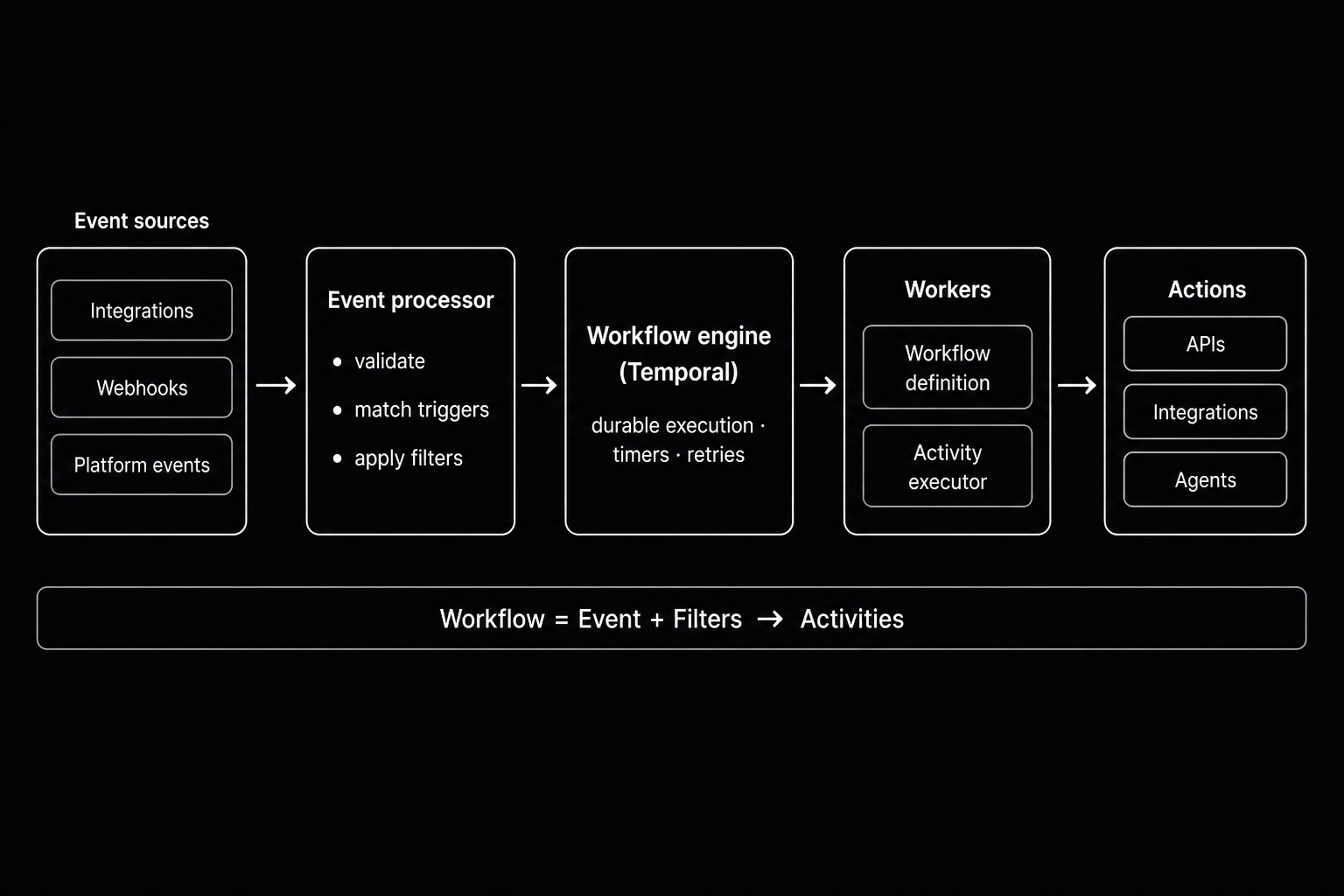
Registries make the platform extensible:
- Events — what can trigger work, plus schema
- Activities — what can be executed, request/response schema, how to invoke it
- Workflows — trigger event, filters, step config
- Workflow instances — individual runs, for monitoring and audit
An agent creating a workflow is then “just” writing into that model: pick an event, attach filters, attach activities. The orchestration layer underneath stays the same.
That was intentional and somewhat futuristic at the time: treat workflows as the safe, fault-tolerant, monitorable entry point between the rest of the system and agents. Agents should not poke half a dozen services with brittle scripts. They should submit a workflow (or produce events that workflows already handle).
Events + filters = trigger
A trigger is not only an event type. It is event + filters on event attributes.
Example filter shape (conceptually):
{
  "{{event.source}}": { "eq": "slack" },
  "{{event.name}}": { "~starts": "T" }
}
The event processor:
- Consumes inbound events
- Validates them against the event registry
- Finds workflows registered on that event
- Evaluates filters against the event payload / annotated context
- Starts a workflow instance only when filters match
Annotation matters for filters that need related entity data (ticket fields, account attributes, and so on). The idea: enrich the event once, then evaluate filters against a consistent context — instead of every filter author reinventing joins.
Activities are the work units
An activity is a unit of work with a schema and a connection path (HTTP, gRPC, internal API, sleep, …).
The activity executor (simplified):
- Create a per-step execution record (for monitoring)
- Resolve inputs from workflow context (including liquid-style templates over event / prior outputs)
- Validate against the activity’s request schema
- Invoke the activity
- Store the result back into context for later steps
- Mark the step finished (or failed)
That separation is what makes Temporal useful here: the workflow definition stays about control flow; the executor stays about doing work.
One Temporal definition, many customer workflows
You cannot ship a new Temporal workflow function for every automation someone creates. The useful pattern is a single dynamic definition: Temporal runs one durable function, and that function interprets a config — the list of steps the customer (or agent) authored.
At a high level, each run does something like:
- Mark the workflow instance as started
- For every step in the config:
- wait on dependencies if the step is part of a DAG
- skip the step if branch / fan-out filters say it should not run
- execute the activity (with that step’s retry policy)
- optionally durable-sleep when the step is a wait
- record success so downstream steps can proceed
- on failure: abort, continue, or compensate — depending on policy
- Mark the instance finished when all work settles
That is the whole idea. The interesting engineering is not a particular function body — it is mapping product semantics (DAG edges, waits, retries, failure modes) onto Temporal primitives.
What that buys you vs queues:
Parallelism + DAG dependencies
Independent steps can run together. Dependent steps wait until upstream work is done (or skipped). You get a pipeline graph without writing a custom scheduler.
Sleeps that outlive deploys
Waiting hours, days, or months is a durable timer — not setTimeout in a Node process, and not a delayed queue message you have to reconcile by hand after every deploy.
Pass outputs forward
Activity results become part of the run’s context. Later steps can use earlier outputs as inputs. The graph is dataflow as well as control flow.
Retries per step
Each step can carry its own retry policy (attempts, backoff). You do not rewrite a consumer for every automation.
Failure modes: abort, continue, compensate
- Abort — stop the run
- Continue — let the rest of the graph proceed when it does not need the failed output
- Compensate — run undo / cleanup for work already completed (saga-style)
Fan-out branches
Step-level filters decide whether a branch should run. Skipped work can cascade so downstream steps that depended on a skipped branch do not fire. Branching stays inside the workflow model instead of spawning one-off consumers for every if/else.
Agent entry point: ticket status management
Once the platform exists, agents become consumers of the same abstractions.
Example agent:
- Trigger on new message on a ticket
- Activity: inspect message + current ticket status
- Activity: update status if the conversation warrants it (e.g. customer replied → reopen; resolution confirmed → close)
The agent does not need a private long-running process with its own retry story. It registers (or uses) a workflow whose trigger and activities are already durable, observable, and constrained by schemas.
That was the design bet: workflows as the control plane for automation and agents, not a bolt-on script runner.
Monitoring
Because every run is a workflow instance and every step is a workflow-instance activity, you get a natural audit trail:
- which event started the run
- which filters matched
- which steps ran, skipped, failed, compensated
- activity inputs/outputs for debugging
Temporal’s own history complements that for execution-level retries and timers. The product DB holds the business-facing status.
What I would emphasize if I rebuilt it
Keep the workflow definition thin. Control flow in Temporal; side effects in activities. Determinism bugs are expensive.
Invest in registries early. Events and activities as schemas are what let agents and UI authors compose safely.
Failure policy is product UX. Abort vs continue vs compensate is not an implementation detail — it is how customers reason about automation risk.
Queues still belong in the design — for ingest buffering — but not as the orchestrator. SQS (or equivalent) in front of the event processor is fine. Replacing Temporal with “more queues” for sleeps, DAGs, and sagas is where complexity explodes.
Closing
Building this platform was less about “calling Temporal” and more about drawing a hard line:
- Events + filters decide when work starts
- Activities define what work is
- Workflows define how work proceeds
- Temporal makes that how durable, replayable, and operable
Queues move messages. Workflow engines move processes. Once agents enter the picture, you want processes — fault-tolerant, safe, and monitorable — as the entry point, not a pile of one-off consumers.